Product
The Dendrite CLI Utility
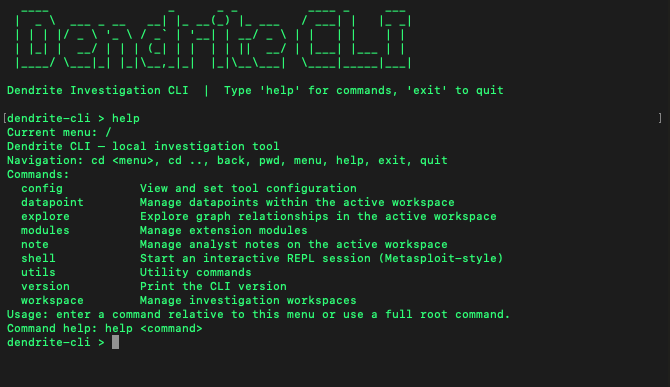
We built a thing - and it’s almost ready for public release. The Dendrite CLI utility enables users to perform analysis in locally saved workspaces between syncs with your cloud-based profile.
As an Internet Intelligence company with a strong focus on building datasets from signal collection, most of our initial conversations tend to focus on our proprietary data for training security-focused Agentic AI systems. As such, we often have to remind prospects that the training datasets are downstream products from offerings focused on empowering the human analysts at the frontlines.
At go-live, we planned for clients and partners to be able to interact with data through two primary methods, which were limited to the Unified Web Platform and API access. For inter-team and inter-organization collaboration, forums, building and sharing investigations live, exploring data in graphical views, encrypted chat, and the like, the Unified Web Platform will be an attractive option for many teams. For those with the in-house capabilities and who are seeking more direct fusion with their team’s existing workflow and security platforms, the API will be an attractive option.
However, we began developing a third option in late February, which is currently going through final internal reviews and testing before being offered for download: The Dendrite CLI utility - and yes, I’m still trying to think of a cool name for this.
Utility Overview
Written in Go (aka “Golang”), this is a CLI utility that enables analysts to perform investigations locally on their work-authorized device. Access is controlled via a DENDRITE_API_KEY, which is distributed to each user by organization admins from the Unified Web Platform, and can be stored in the tool’s configuration or read directly from the device’s system keychain. Researchers and analysts familiar with BloodHound and Metasploit will immediately recognize the layout and logic of the Dendrite CLI Utility as a close analogue, as they build and save a “workspace”, populating the workspace with the values and pivot points they have on hand. They can also specify how many degrees of separation from their data points they wish to query, specify a confidence score threshold required for the data to be presented, and remove (or “prune”) erroneous data presented.
When a workspace is executed, the CLI utility sends your query to our cloud to retrieve both enriched records and their relationships, which then populate your local Neo4j database. The CLI tool will serve as the main front end of this application, but it will build the Neo4j + Bloom-readable files within the database, granting the option to explore data within Neo4j or continue to use the CLI utility.
As with the online platform, each node or data point returned by a query represents a full standalone record enriched with many hundreds of data points, each of which comes pre-correlated to other values and records. Like the graphical data view of the Unified Web Platform, users can explore these records, their correlations, and even highlight stored paths relevant to their investigation or analysis.
Additionally, users can export their workspaces (nodes, relationships, notes) in GraphML, MTGX, and CSV. All actions are saved locally but can be synced with ongoing investigations and group projects within your Unified Web Platform workspaces.
Current Development
As mentioned above, the utility is currently passing through the final phases of internal alpha testing, but we plan to progress to limited beta testing in the coming weeks & months. While the core functionality is pretty well fleshed out, we’re hoping to enhance the way users add and explore notes from the CLI, and how this ultimately syncs with each user’s workspaces within the Unified Web Platform.
Once complete, the CLI Utility can be downloaded from the Unified Web Application by existing customers and partners, assuming that your organization admin has allowed this.
Future Releases
After we achieve our targets for the core functionality, we’re planning to release the tool open-source so that it can be used by the cybersecurity and OSINT communities to aid in their investigations and projects. Initially, analysis for a lot of these projects will need to be performed manually, as we do not currently offer retail subscription accounts or enable link & correlation analysis on local machines.
We’re committed to maintaining this utility with security and functionality updates for many years. In the immediate future, however, we’re planning to release documentation, a series of instructional videos, and plenty of information to get you started. As always, we will share these updates through the Dendrite blog, LinkedIn, and X accounts.
Happy hunting!